Professional Media Encryption & File Encryption, e.g.,
wmv, avi, asf, mpg, rm, rmvb, mp4, flv,mpeg , and other files,
Easily distribute your files and protect it
The latest version of our software will be published on this website, Users can visit this website for the latest version of software.
Upgrade freely within one year after purchasing
Welcome !
Dear friend,
Thank you for coming to our site,
We are committed to the development of encryption software, We have over 1000 customers all around the world. Afters thousands of test,our software have been proved to be reliable. You will have no problem purchasing the full registered version no matter where in the world you live!
We offer you good quality services.
Sincerely,
Your DRMSoft.com,
DRMSoft.com CTO,
DRMsoft Pdf to EXE Encrypter 10.0
Encrypt and convert pdf to exe with password protected self-running
Highlights:
· Encrypt and convert pdf to exe with password protected self-running
· You can set whether or not allow the users print pdf.
· Watermarks can be added to pdf, support fixed or floating watermark;
Supported Operating System: Windows XP/Vista/win7/win8/win10, support 32-bit and 64-bit OS;
Encrypt your pdf files to exe files that can only be opened when a Open Password is provided (PC-
binding or Non-PC-binding), and users can only open the encrypted pdf files after obtaining the Open
Password provided by you.
The encrypted file support One Computer One Password(What is this?)
You can either distribute Open Password offline, or use your website(customized function).
Key Features :
The encrypted files can be
used to achieve the following:
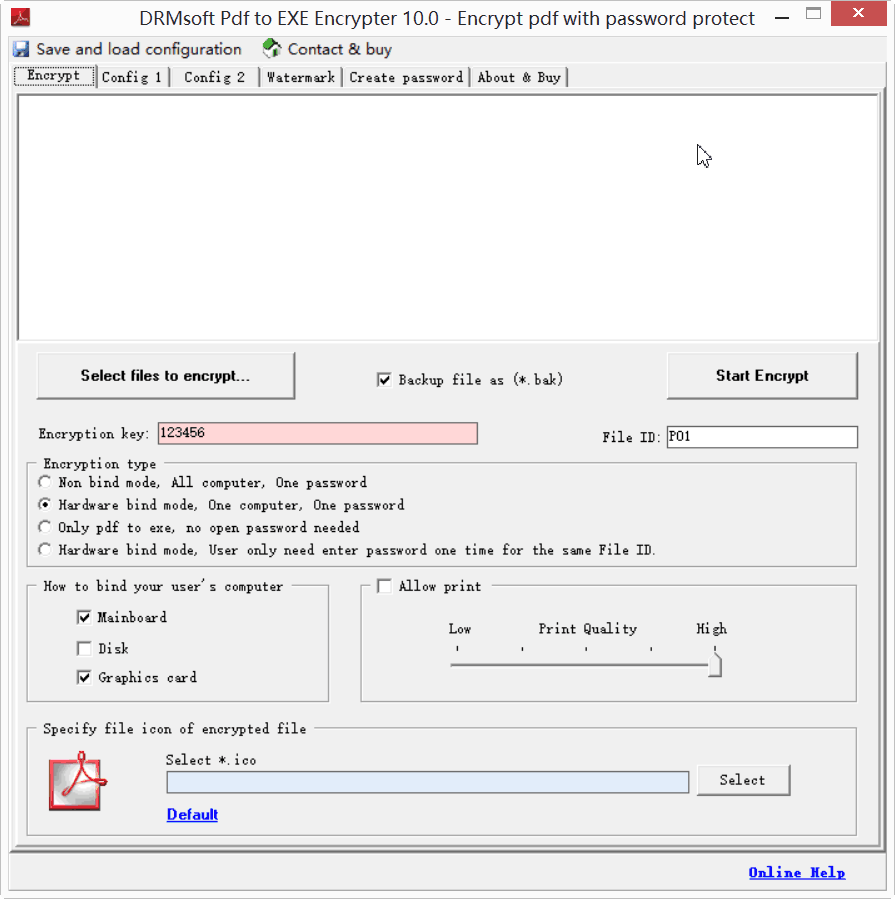
Multiple encryption modes:
Non-PC-Binding, All computer ,One password;
PC-Binding, One computer,One password;
Pdf to exe , Convert pdf to exe only, no password needed;
Only need to be authenticated once on the same computer(With same Key and Product ID).
You can specify the number of opening allowed, the time of opening and expiry date.
Your users don't need install any pdf reader.
Watermarks can be added to pdf, support fixed or floating watermark;
You can configure a user prompt so as to let users know how to contact you to obtain the Open Password;
Popular screen recording can be prevented.
It can be configured to prevent opening in VMware and Virtual PC
You can set print quality
You can set whether or not allow the users print pdf.